
Reaper
Sherlock Scenario
Our SIEM alerted us to a suspicious logon event which needs to be looked at immediately . The alert details were that the IP Address and the Source Workstation name were a mismatch .You are provided a network capture and event logs from the surrounding time around the incident timeframe. Corelate the given evidence and report back to your SOC Manager.
Evidence Extraction
The investigation began by extracting the provided Reaper.zip archive using the supplied password. After extraction, the contents of the working directory were checked to confirm that the evidence folder had been created successfully.
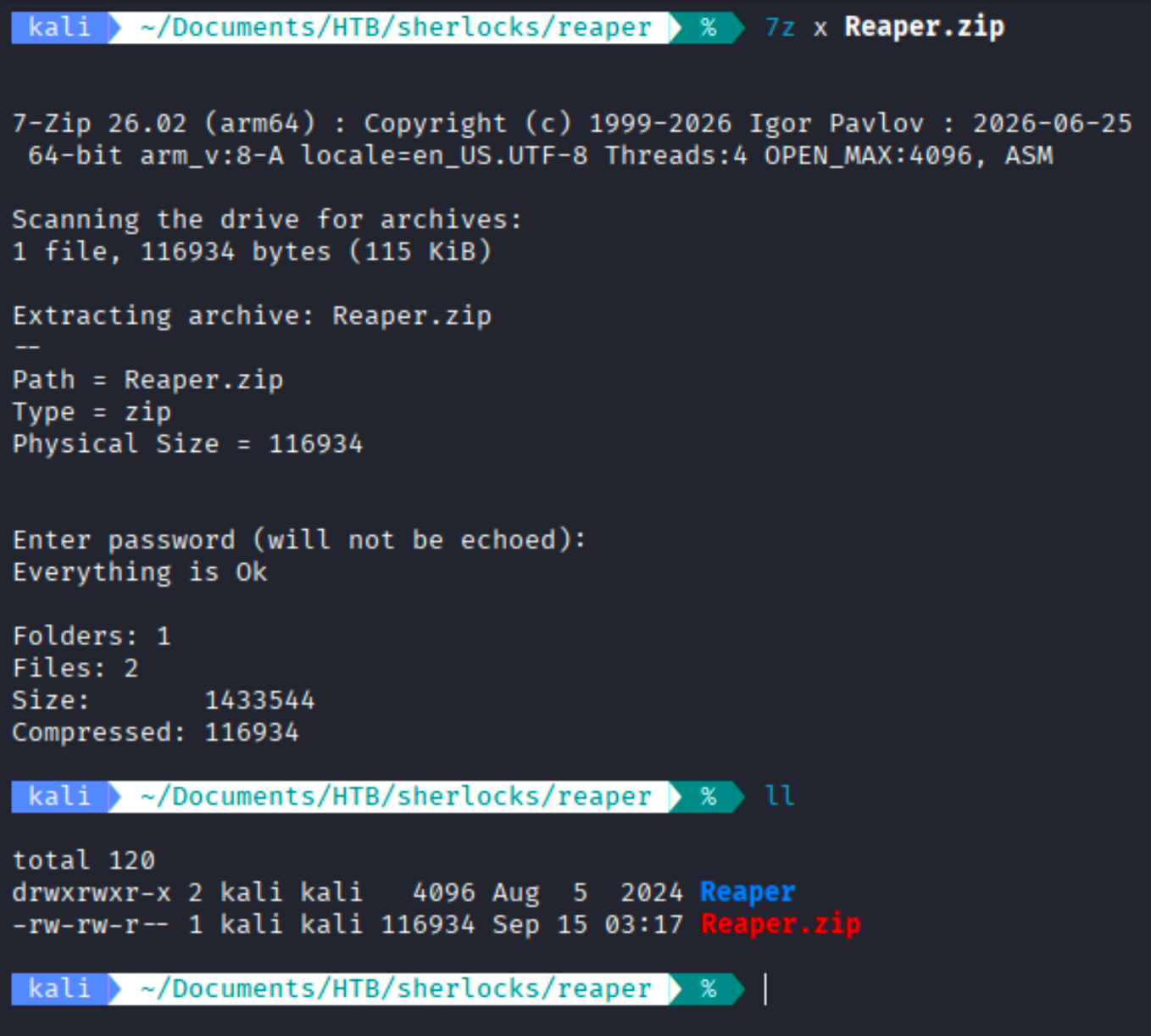
The extraction completed successfully and created a directory named Reaper. This confirmed that the challenge evidence had been recovered and was ready for examination.
Next, the extracted directory was opened and its contents were reviewed. Two primary forensic artifacts were identified: ntlmrelay.pcapng, containing the network traffic captured around the incident, and Security.evtx, containing Windows Security event logs. To simplify event log analysis, the Security.evtx file was processed using Chainsaw and exported into JSON format with the following command: chainsaw search -e ".+" Security.evtx --json -o all_event.json .
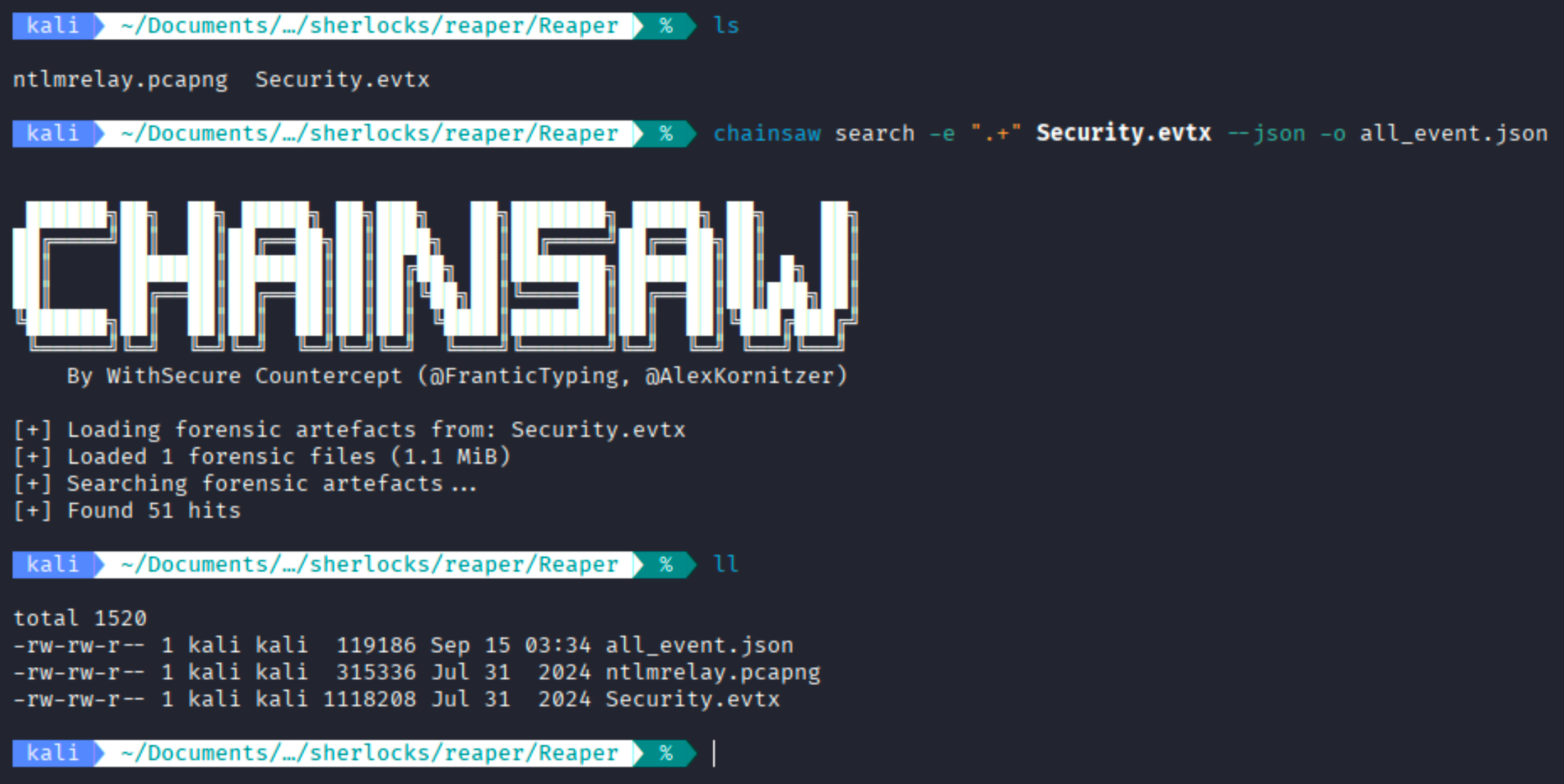
Chainsaw successfully processed the Windows Security log and returned 51 events, producing the all_event.json file. This JSON file was then used for easier filtering and correlation of authentication-related fields such as usernames, workstation names, source IP addresses, source ports, Logon IDs, and share-access information. The ntlmrelay.pcapng file was retained for the network-level analysis of SMB, NTLM, and NBNS traffic.
The investigation was conducted progressively by correlating the network capture with the Windows Security logs. I first established the legitimate workstation-to-IP mappings from the network traffic. These findings were then used as reference points to identify the compromised account, the unknown system involved in the authentication flow, and the corresponding malicious Windows logon session. Each subsequent filter is therefore based on evidence established in the preceding steps.
Question: What is the IP Address for Forela-Wkstn001?
Analysis / Investigation:
To identify the IP address associated with FORELA-WKSTN001, I analyzed the NBNS (NetBIOS Name Service) traffic in the provided ntlmrelay.pcapng packet capture. The following command was used to filter NBNS packets containing the workstation name:
tshark -r ntlmrelay.pcapng -Y "nbns" | grep -i "wkstn001"
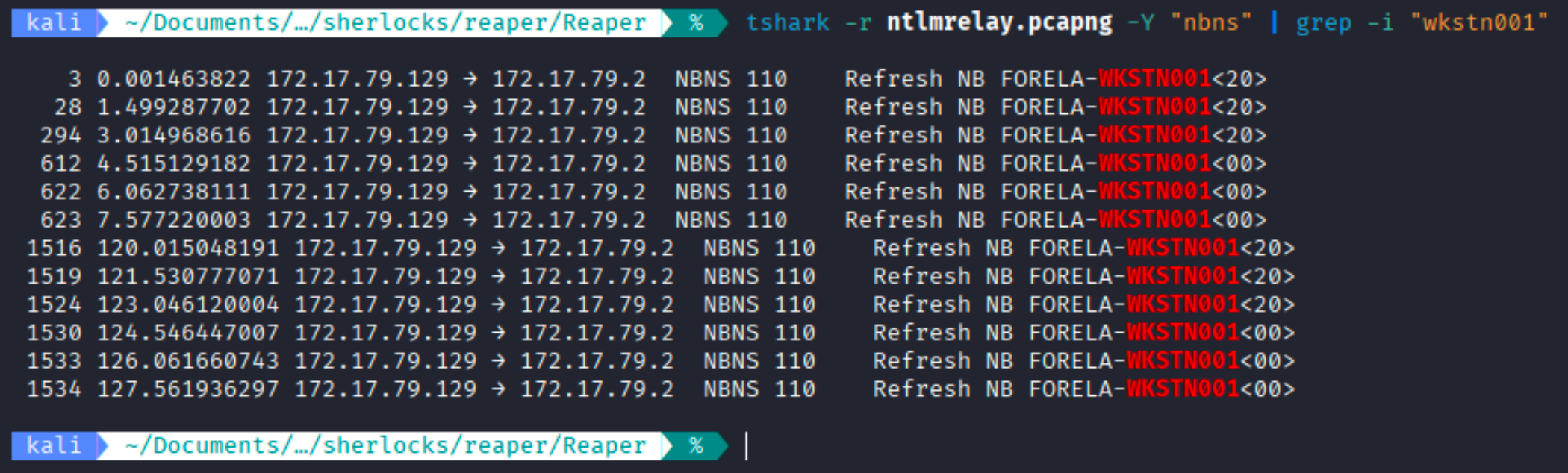
The filtered traffic shows multiple NBNS refresh messages for FORELA-WKSTN001. These packets consistently originate from 172.17.79.129, confirming the association between the workstation and this IP address.
Ans: 172.17.79.129
Question: What is the IP Address for Forela-Wkstn002?
Analysis / Investigation:
To identify the IP address associated with FORELA-WKSTN002, I analyzed the NBNS (NetBIOS Name Service) traffic in the provided ntlmrelay.pcapng packet capture. The following command was used to filter NBNS packets containing the workstation name:
tshark -r ntlmrelay.pcapng -Y "nbns" | grep -i "WKSTN002"
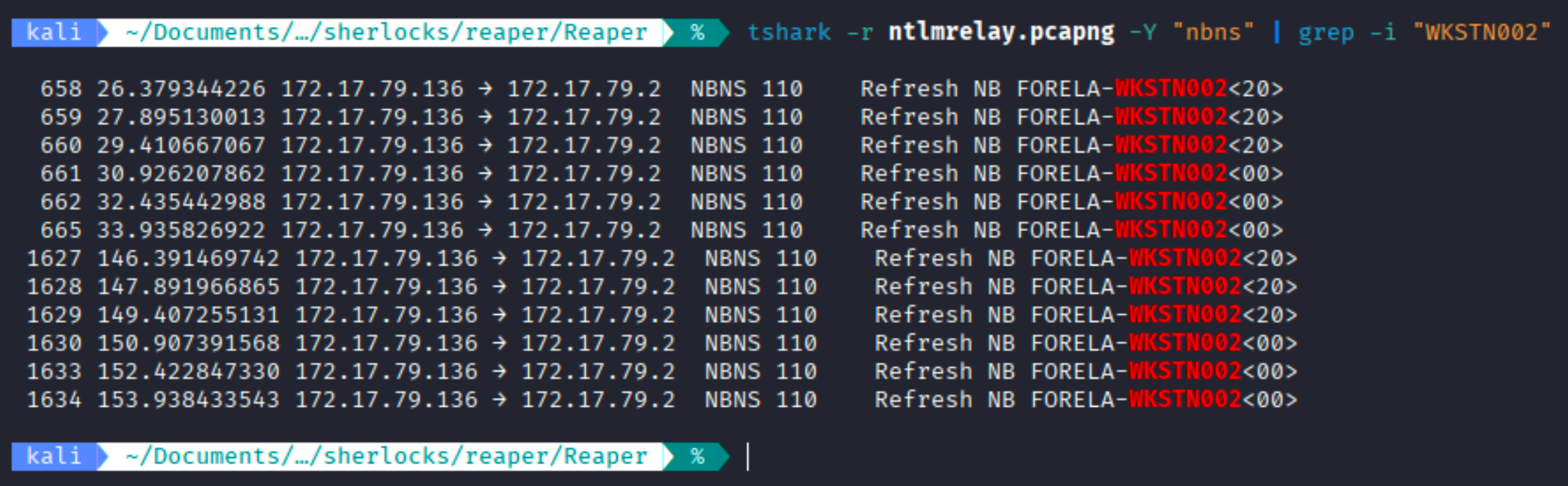
The filtered traffic shows multiple NBNS refresh messages for FORELA-WKSTN002. These packets consistently originate from 172.17.79.136, confirming the association between the workstation and this IP address.
Ans: 172.17.79.136
Question: What is the username of the account whose hash was stolen by attacker?
Analysis / Investigation:
To identify the compromised account, I examined the NTLM authentication traffic in the provided ntlmrelay.pcapng packet capture. The following command was used to extract the source and destination IP addresses, domain name, and authenticated username from NTLMSSP authentication messages:
tshark -r ntlmrelay.pcapng \
-Y "ntlmssp" \
-T fields \
-e ip.src \
-e ip.dst \
-e ntlmssp.auth.domain \
-e ntlmssp.auth.username
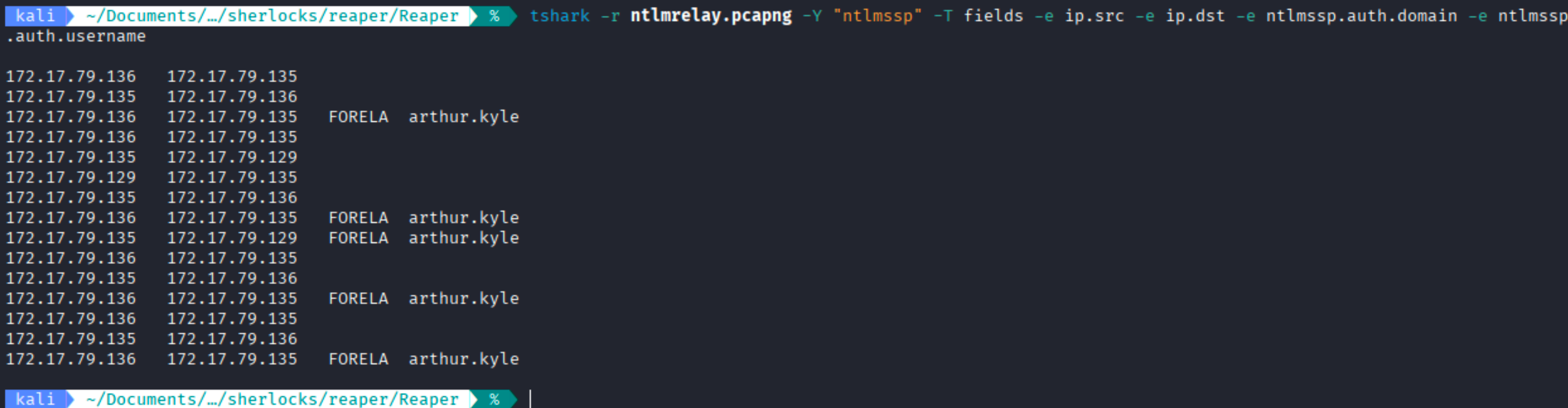
The captured NTLM authentication traffic reveals the domain FORELA and the authenticated username arthur.kyle. Since the username is present directly within the NTLMSSP authentication messages, this identifies arthur.kyle as the account whose credentials were involved in the suspicious authentication activity. The traffic also shows communication involving the previously identified workstation 172.17.79.136 and an additional host, 172.17.79.135; the role of this additional host is investigated in the next step.
Ans: arthur.kyle
Question: What is the IP Address of Unknown Device used by the attacker to intercept credentials?
Analysis / Investigation:
The previous steps established 172.17.79.129 as FORELA-WKSTN001, 172.17.79.136 as FORELA-WKSTN002, and arthur.kyle as the compromised account. To determine whether another system was positioned between these known hosts during the NTLM authentication flow, I examined all NTLMSSP authentication messages containing a username. The following command extracts the unique source and destination IP addresses together with the domain, username, and workstation hostname without assuming the attacker IP in advance:
{
printf "Source IP\tDestination IP\tDomain\tUsername\tHostname\n"

tshark -r ntlmrelay.pcapng \
-Y 'ntlmssp.auth.username' \
-T fields \
-E separator=/t \
-e ip.src \
-e ip.dst \
-e ntlmssp.auth.domain \
-e ntlmssp.auth.username \
-e ntlmssp.auth.hostname | sort -u

} | column -t -s $'\t'

The output shows NTLM authentication for arthur.kyle travelling from 172.17.79.136 to 172.17.79.135, followed by the same authentication identity travelling from 172.17.79.135 to 172.17.79.129. Since 172.17.79.136 and 172.17.79.129 were already mapped to the two legitimate FORELA workstations, 172.17.79.135 is the previously unidentified system positioned between them. This establishes 172.17.79.135 as the attacker-controlled intermediary used to intercept and relay the authentication.
Ans: 172.17.79.135
Question: What was the fileshare navigated by the victim user account?
Analysis / Investigation:
To determine which fileshare was accessed by the victim account, I examined SMB2 Tree Connect requests in the ntlmrelay.pcapng capture. SMB2 Tree Connect traffic reveals the network shares that a client attempts to access. The following command was used to extract unique source and destination IP addresses together with the requested share paths:
{
  printf "Source IP\tDestination IP\tFileshare\n"

  tshark -r ntlmrelay.pcapng \
    -Y 'smb2.cmd == 3 && smb2.flags.response == 0 && smb2.tree' \
    -T fields \
    -E separator=/t \
    -e ip.src \
    -e ip.dst \
    -e smb2.tree | sort -u

} | column -t -s $'\t'

The output shows several SMB2 Tree Connect requests originating from 172.17.79.136, which was previously identified as FORELA-WKSTN002. Among these requests, the workstation accessed both the standard IPC$ administrative share and the named share \\DC01\Trip. Because the question asks for the fileshare navigated by the victim user, the named user-accessed share is \\DC01\Trip, while IPC$ represents an SMB administrative/inter-process communication share used by the system.
Ans: \DC01\Trip
Question: What is the source port used to logon to target workstation using the compromised account
Analysis / Investigation:
The previous network analysis identified arthur.kyle as the compromised account and 172.17.79.135 as the attacker-controlled intermediary. I therefore used the known compromised username as a pivot into the Windows Security events to locate the corresponding logon record. The following command extracts the logon type, authentication package, workstation name, source IP address, and source port so that the malicious network logon can be identified and its source port determined.
jq '
  .. |
  objects |
  select(.TargetUserName? == "arthur.kyle") |
  {
    TargetUserName,
    LogonType,
    AuthenticationPackageName,
    WorkstationName,
    IpAddress,
    IpPort
  }
' all_event.json

The event shows a Logon Type 3, indicating a network logon, authenticated through NTLM for the account arthur.kyle. The connection originated from 172.17.79.135, which was previously identified as the attacker-controlled device, and the recorded source port was 40252.
Ans: 40252
Question: What is the Logon ID for the malicious session?
Analysis / Investigation:
The previous step identified the suspicious Windows network logon as the session for arthur.kyle originating from 172.17.79.135 using source port 40252. With these session attributes already established, I examined the same logon record to retrieve its Windows TargetLogonId. The following command displays the username, source IP, source port, and Logon ID together, allowing the malicious session to be uniquely correlated with later Security events.
{
  printf "Username\tSource IP\tSource Port\tLogon ID\n"

  jq -r '
    .. |
    objects |
    select(.TargetUserName? == "arthur.kyle") |
    [
      .TargetUserName,
      .IpAddress,
      (.IpPort | tostring),
      .TargetLogonId
    ] |
    @tsv
  ' all_event.json

} | column -t -s $'\t'

The result shows the malicious session for arthur.kyle originating from 172.17.79.135 using source port 40252. The corresponding TargetLogonId recorded for this session is 0x64a799, allowing the same session to be correlated with subsequent Windows Security events.
Ans: 0x64A799
Question: The detection was based on the mismatch of hostname and the assigned IP Address.What is the workstation name and the source IP Address from which the malicious logon occur?
Analysis / Investigation:
At this stage, the compromised account, attacker-controlled IP address, source port, and malicious Logon ID had already been identified. I therefore returned to the original SIEM alert condition—the mismatch between the source workstation name and its expected IP address. The malicious Windows logon event reports the workstation name as FORELA-WKSTN002, but records the source IP address as 172.17.79.135.
The following command was used to extract the relevant malicious logon details from all_event.json:
{
  printf "Username\tWorkstation Name\tSource IP\tSource Port\tLogon ID\n"

  jq -r '
    .. |
    objects |
    select(.TargetUserName? == "arthur.kyle") |
    [
      .TargetUserName,
      .WorkstationName,
      .IpAddress,
      (.IpPort | tostring),
      .TargetLogonId
    ] |
    @tsv
  ' all_event.json

} | column -t -s $'\t'
Next, I examined the NBNS traffic in ntlmrelay.pcapng to determine the legitimate IP address associated with FORELA-WKSTN002.
{
  printf "Source IP\tHostname\n"

  tshark -r ntlmrelay.pcapng \
    -Y 'nbns' \
    -T fields \
    -E separator=/t \
    -e ip.src \
    -e nbns.name |
    grep -i "WKSTN002" |
    sort -u

} | column -t -s $'\t'

The Windows Security event shows the malicious logon originating from 172.17.79.135 while reporting the workstation name as FORELA-WKSTN002. However, the NBNS traffic shows that FORELA-WKSTN002 is legitimately associated with 172.17.79.136. This mismatch confirms that the logon did not originate directly from the legitimate workstation and instead came from the attacker-controlled device at 172.17.79.135.
Ans: FORELA-WKSTN002, 172.17.79.135
Question: At what UTC time did the the malicious logon happen?
Analysis / Investigation:
The malicious Windows logon had already been correlated with the account arthur.kyle, source IP 172.17.79.135, source port 40252, and Logon ID 0x64a799. To determine when this session occurred, I returned to the corresponding Windows Security event and extracted its TimeCreated value together with the known session details. The source port 40252 and username arthur.kyle were used to isolate the relevant logon record, while the remaining fields were displayed to verify that the event matched the previously identified malicious session.
{
  printf "UTC Time\tUsername\tSource IP\tSource Port\tLogon ID\n"

  jq -r '
    .[] |
    select(
      .Event.EventData.TargetUserName? == "arthur.kyle" and
      (.Event.EventData.IpPort? | tostring) == "40252"
    ) |
    [
      (
        .Event.System.TimeCreated_attributes.SystemTime //
        .Event.System.TimeCreated.SystemTime //
        .Event.System.TimeCreated
      ),
      .Event.EventData.TargetUserName,
      .Event.EventData.IpAddress,
      (.Event.EventData.IpPort | tostring),
      .Event.EventData.TargetLogonId
    ] |
    @tsv
  ' all_event.json

} | column -t -s $'\t'

The matching event shows the timestamp 2024-07-31T04:55:16.240589Z. The Z suffix indicates that the timestamp is recorded in UTC. This event matches the previously identified malicious session for arthur.kyle, originating from 172.17.79.135 on source port 40252.
Ans: 2024-07-31 04:55:16
Question: What is the share Name accessed as part of the authentication process by the malicious tool used by the attacker?
Analysis / Investigation:
This question refers specifically to the share accessed as part of the malicious authentication session, which is different from the \\DC01\Trip share previously navigated by the victim user. Because the malicious session had already been identified by the account arthur.kyle, Logon ID 0x64a799, source IP 172.17.79.135, and source port 40252, I examined Windows Security events containing network share information and compared those fields with the known session. The following command extracts the username, Logon ID, source IP, source port, and share name for correlation.
{
  printf "Username\tLogon ID\tSource IP\tSource Port\tShare Name\n"

  jq -r '
    .. |
    objects |
    select(.ShareName? != null) |
    [
      .SubjectUserName,
      .SubjectLogonId,
      .IpAddress,
      (.IpPort | tostring),
      .ShareName
    ] |
    @tsv
  ' all_event.json |
  sort -u

} | column -t -s $'\t'

The output shows that the session associated with arthur.kyle, Logon ID 0x64a799, source IP 172.17.79.135, and source port 40252 accessed the \\*\IPC$ share. Since these values match the previously identified malicious session, this confirms that IPC$ was accessed as part of the attacker’s authentication/relay activity.
Ans: \*\IPC$
Leave a comment